I’ve been playing with the N80i a bit over the weekend and have been reasonably happy. The first thing I did (before even moving my SIM card to the new phone) was test the VOIP features. As a Mac user I did not use the Nokia CD, which I am assuming had the Gizmo Project software as I could not find it natively on my phone. However, a quick Google search revealed a web site where it was easily downloaded and installed to the phone. After literally 30 seconds of set-up (entering my Gizmo username/password) I was able to make phone calls over my home wireless network using VOIP. Sound quality was very good. As good as my hardwired $300 Polycom phone connected to my Voicepulse bridge. (Update: By going to my download folder and selecting Options/Update List, I was able to get the Gizmo client and a bunch of other add-ons)
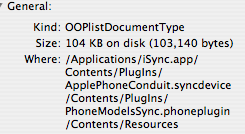
Step two was to connect the phone to iSync and get my address book transfered. Ran into a bit of a problem with this one, but it was easily solved by modifying one of my plist files locally. If you would like a copy, just leave a comment and I’ll post it for you. With the modification, iSync worked perfectly and my address book moved across complete with photos for contacts.
Cell phone voice quality seemed adequate and certainly on par with the Blackberry Pearl and Razr I had been using prior to this phone. No real issues yet on that front, but I’ll report again once I’ve used it during the business week.
A few shortcomings:
- Proprietary charger and sync adapter. These days, I really expect my devices to charge and sync over mini-USB and to be able to trickle charge them via my computer’s USB port.
- No 3.5mm headphone jack! That pretty much rules this out as a media device or me. I could buy the Nokia adapter for this purpose, but I probably won’t.
This post makes me think that the N95 really may be the perfect phone as it addresses a lot of these shortcomings. However, the key question is whether the N95 will support the VOIP services like the N80i.
Update:
By request, here is my updated file (right click to download).
Just replace the file in this directory (make a back-up first!)
Proceed at your own risk!